
Baby Tracker by Sprout
Sprout AppsParenting
4.246.00 Reviews
- Version
- 1.7
- Installs
- 10.00K
- Age Rating
- Teen
Screenshots
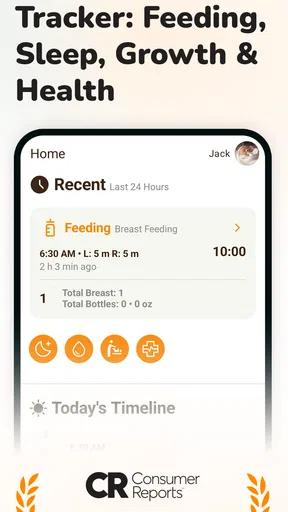
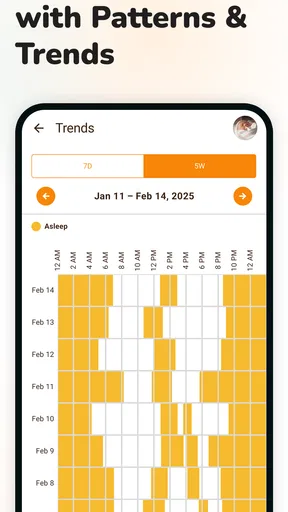
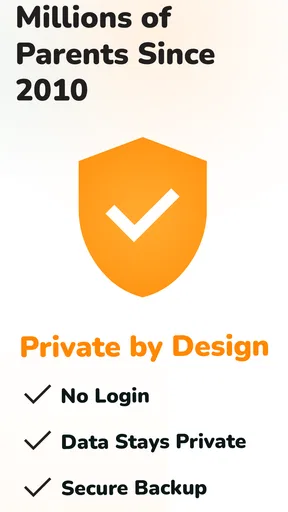
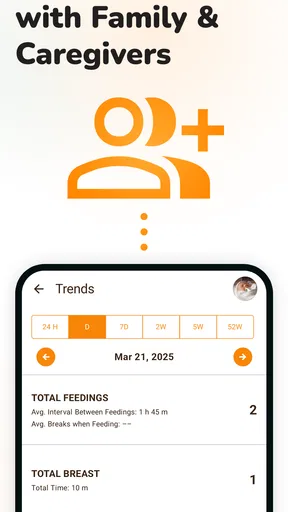
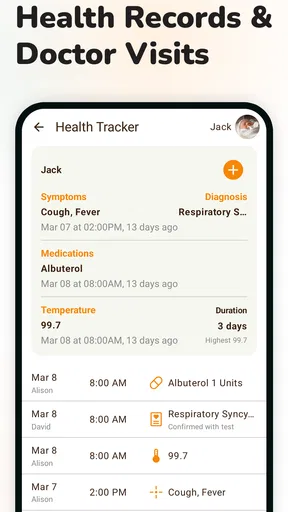
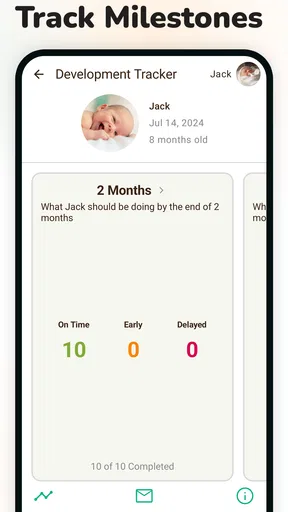
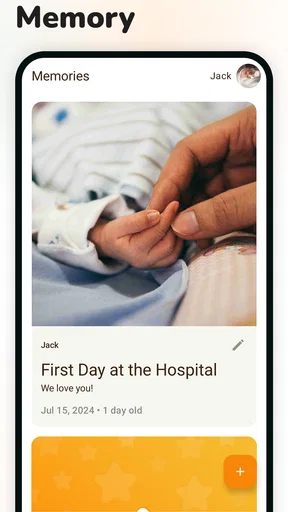
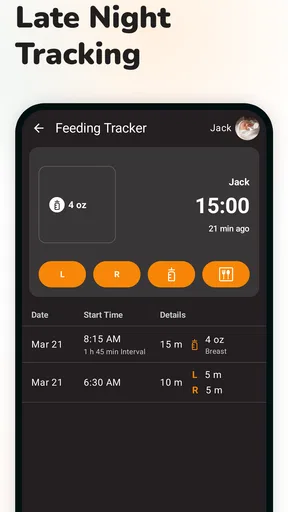
Our Review of Baby Tracker by Sprout
 Analysis by Appyee
In the first week with a new baby, even small details can blur together: when a feed began, how long a nap lasted, and whether that diaper change happened before or after the last bottle. I find that Baby Tracker by Sprout is most appealing when it takes those details out of my head and gives them a place to land. It is a parenting app for recording everyday care, and the value is less about turning a routine into a project than about making the routine easier to remember.
Getting Started with Baby Tracker
First things first, installing Baby Tracker by Sprout is a breeze. Available on both Android and iOS, you can find it easily in your app store. Once downloaded, you're greeted with a user-friendly interface that's as inviting as a cozy nursery. The app walks you through a simple setup process, asking for basic information about your little one, like birth date and name. It's almost like a digital baby book, but way more practical.
Sprout Apps has made a tracker that suits the stop-and-start rhythm of new-parent life. The app is free to download, with optional in-app purchases, so it is possible to try the basic experience before deciding whether it deserves a regular place on your phone. It has a 4.2 average from around 188 ratings and over 10,000 installs. Its current version is 1.7, it was released on October 11, 2023, and its content rating is Teen. Those details matter less than whether recording information feels manageable when you are tired, but they help set expectations: this is an established, focused tool rather than a medical service.
Features That Make Life Easier
Now, onto the good stuff. Baby Tracker offers a comprehensive array of features that cover all your parenting needs. You can log feedings, diaper changes, sleep patterns, and even milestones. And it doesn't stop there. The app also allows you to track growth and medical history, making pediatrician visits a lot less daunting. Trust me, having all this info in one place is like having a personal assistant for your baby.
The feeding tracker is particularly handy. Whether you're breastfeeding, bottle-feeding, or doing a mix of both, you can log every session with a simple tap. The app even lets you set reminders, so you never miss a feeding. No more trying to remember if you fed the baby at 2 AM or was that just a dream?
A useful way to get more from those logs is to record only what will help you make a decision later. If feeding is the immediate concern, concentrate on feed times and the details you and your care team actually discuss; if sleep is the current challenge, make sleep entries the priority. Logging everything in equal detail can turn a helpful record into a second job. The practical win is having a recent history to consult, not producing a perfect diary.
That distinction also matters when you share information with a pediatrician. A record can help you recall what happened over several days, especially when visits are brief and the household routine is tiring. I would treat it as a memory aid and conversation starter, not as a diagnosis or a substitute for professional advice. If a health concern feels urgent, an app log should not delay contacting a qualified clinician.
Customization and User Experience
What I love about Baby Tracker is its customization options. You can tailor the app to suit your specific needs. For instance, if you're more focused on sleep training, you can prioritize sleep logs on your dashboard. The interface is intuitive and easy to navigate, even during those sleep-deprived nights when you're running on coffee and pure willpower.
The app's design is visually appealing without being cluttered, which is a blessing when you have baby toys and laundry piling up around you. The color-coded logs make it easy to spot patterns, helping you adjust your baby's routine as needed. It's like having a parenting guide right in your pocket.
Pattern-spotting is most useful when you compare a few days of notes rather than reacting to one unusual night. For example, if naps have seemed shorter, a run of entries may help you see whether the change is consistent or whether that impression came from a particularly difficult day. I would avoid treating a visual trend as a rule for what a baby should do: babies vary, and a chart cannot explain every reason behind a change. The record is there to support observation, not to prescribe a schedule.
There is a small but real trade-off in customization. Choosing a focus makes the app feel more relevant, but it also means the most useful setup may change as your needs change. A feeding-heavy routine at the start may give way to more attention to sleep, health notes, or milestones later on. I would revisit what I am tracking occasionally and remove the pressure to keep up with categories that no longer answer a useful question.
Sharing and Syncing with Family
Another feature worth mentioning is the app's ability to sync data across multiple devices. This means both parents, and even grandparents, can stay in the loop. Sharing responsibilities becomes much easier when everyone has access to the same information. You can easily share logs with your partner, so they're never out of the loop, even if they're away at work. It's a game-changer for modern parenting.
Shared records work best when everyone agrees on a simple routine for entering them. If one caregiver records a feed immediately and another waits until later, details can be missed or duplicated. A practical approach is to decide who logs what during a handover, and to use the notes as a quick check rather than assuming that every person will remember the same details. This is especially helpful when a relative takes a shift: a glance at the recent record can make the handoff clearer without a long text exchange.
From the First Week to the Everyday Routine
The first-week appeal is easy to understand: there are many new tasks, little sleep, and no reliable sense of time. A tracker can reduce the mental load of recalling the last feed or diaper change. But the more important test comes after the novelty wears off. Does opening it still help, or does it become another notification and another chore? For me, the answer depends on whether the entries are serving a real purpose in the household.
Picture a typical morning after a broken night. One parent is getting ready to leave, while the other is taking over care and trying to remember whether the baby fed shortly before dozing off. Checking a shared log can replace a vague guess with a recent record. Later, if the day feels unsettled, a quick look at sleep and feeding notes may help both caregivers describe what happened. The benefit is modest but tangible: fewer repeated questions and less reliance on a memory that has been interrupted all night.
It can also be useful when care is split across several people, or when a parent wants a concise history before an appointment. In those situations, having feeding, sleep, diaper, and health notes together is more convenient than piecing them together from messages, paper scraps, or memory. On the other hand, if one person is the only caregiver and already remembers the routine comfortably, the extra logging may offer little in return.
Compared with a paper notebook, a phone-based tracker is easier to check during a handoff and can bring different kinds of care records together. A notes app is more flexible and can be enough for someone who wants only occasional reminders, but it may take more effort to keep entries consistent and find a pattern later. A broad family calendar is useful for appointments and shared plans; it is less naturally suited to the repeated details of feeds, naps, and diaper changes. Baby Tracker's place is between those approaches: more structured than free-form notes, but still dependent on caregivers choosing to keep it current.
Keeping the Habit Without Turning It into Work
The maintenance burden is the main question I would ask before relying on any baby tracker. Every entry takes a little attention, and the busiest moments are often exactly when opening a phone is inconvenient. If logging makes a caregiver feel that they have failed whenever an entry is late or missing, the tool is working against its purpose. I would use it as a helpful record, not a scorecard, and accept that an incomplete log can still be useful.
A low-friction routine can help. Record the details that are easiest to forget or most likely to come up in a handoff, and leave less important details alone. If you are alternating caregivers, make a quick entry part of the handover rather than expecting someone to reconstruct a whole shift afterward. This approach makes the record more dependable without asking everyone to document every moment.
Reminders can be useful when they match a real routine, but reminders are not automatically helpful simply because they are available. A notification that does not fit the baby's changing needs can become background noise. I would keep only the prompts that answer a practical need and adjust them when the routine changes. For anyone who prefers to respond to the baby rather than follow a timetable, a log used after the fact may feel better than a reminder-led approach.
There is also a privacy and access consideration whenever family information is shared across devices. Before inviting other caregivers into a shared routine, I would make sure everyone understands what information they are expected to enter and who should see it. That is not a reason to avoid sharing; it is simply a sensible boundary for a record that can include health and daily-care details. The app is most helpful when collaboration reduces confusion rather than expanding the number of people who feel responsible for maintaining the log.
Where the Routine Can Wear Thin
Logging fatigue is a genuine risk. During a hard stretch, tracking can feel reassuring because it gives shape to the day. During a calmer stretch, the same repeated entries may seem unnecessary, and missed records can make the timeline less complete. That does not make the app a poor choice; it means its lasting value is tied to a changing need. I would not keep logging simply because I began doing so in the first week.
Another limitation is that records show what was entered, not the full context around it. A sleep entry may capture timing without explaining why a nap was disrupted; a feeding note cannot replace a conversation about a baby's health. When patterns are unclear, more logging is not always the answer. Sometimes the better step is to simplify what you track or ask a healthcare professional a focused question.
The app may not be the right fit for parents who dislike routine data entry, want an unstructured journal, or prefer to keep baby information off a shared digital record. A notebook gives complete control over format, while a simple notes app may suit someone who only needs a handful of reminders. If you need clinical guidance, neither this tracker nor a notebook can replace a clinician. The strongest reason to choose this app is the practical convenience of keeping recurring care details organized in one place.
Final Thoughts
All in all, Baby Tracker by Sprout is a fantastic tool for new parents. It takes a lot of the guesswork out of caring for your baby, allowing you to focus on what really matters—enjoying those precious early moments. The app's comprehensive features, combined with its user-friendly design, make it a must-have for anyone navigating the rollercoaster of parenthood. So, if you're looking for a bit of sanity in the wonderful chaos that is parenting, give Baby Tracker a try. It's like having a little bit of peace of mind in your pocket.
My longer-term verdict is more measured than “must-have.” I would recommend it to caregivers who regularly hand care between people, want an organized history for everyday discussions, or find that tiredness makes routine details hard to remember. I would skip it if keeping a log feels more stressful than useful, or if a simpler paper or notes-based method already works. The app earns lasting space not by asking you to record everything, but by making the details you actually need easier to find when the day gets busy.
Verdict
Strengths of Baby Tracker by Sprout
- Intuitive interface for easy navigation.
- Comprehensive tracking of baby's activities.
- Customizable reminders for routines.
- Offline access to data when needed.
- Secure data backup and synchronization.
Limitations of Baby Tracker by Sprout
- Premium features require in-app purchases.
- Limited integration with other health apps.
- Occasional syncing issues reported.
- Ads can be intrusive in the free version.
- Initial setup can be time-consuming.
Similar Picks in This Category
View All
Family Space
Motorola Mobility LLC.3.9

شرطة الأطفال - مكالمة وهمية
Oub Apps4.1

Findmykids: Parental Control
LETEM LTD4.6

Pregnancy + | Tracker App
Philips Electronics UK Limited4.8

Policía de niños - para padres
Kids police4.7

Pregnancy App
Amila4.9
Frequently Asked Questions
What features does Baby Tracker by Sprout offer?
Baby Tracker by Sprout provides a comprehensive suite of tools to help parents track their baby's growth and development. Key features include feeding logs, diaper change records, sleep tracking, and growth charts. Additionally, it offers milestone tracking, a medical log, and the ability to sync data across multiple devices for seamless access.
Is Baby Tracker by Sprout suitable for multiple children?
Yes, Baby Tracker by Sprout is designed to accommodate multiple children. Parents can easily add profiles for each child, allowing them to track individual progress and milestones. This feature is particularly useful for families with twins or multiple young children, ensuring personalized monitoring for each child.
Can I share my baby's progress with others using Baby Tracker by Sprout?
Absolutely! Baby Tracker by Sprout allows you to share your baby's progress with family members, caregivers, or healthcare professionals. You can generate detailed reports and charts that can be exported or emailed directly from the app, making it simple to keep everyone updated on your child's development.
Is Baby Tracker by Sprout easy to use for new parents?
Yes, Baby Tracker by Sprout is user-friendly and designed with new parents in mind. The intuitive interface makes logging activities quick and easy, and the app provides helpful tips and guidance for first-time users. Its straightforward design ensures that even sleep-deprived parents can navigate it with ease.
Does Baby Tracker by Sprout require an internet connection to function?
No, Baby Tracker by Sprout does not require an internet connection for most of its features. You can log activities, track milestones, and view reports offline. However, an internet connection is necessary for syncing data across devices and any updates that may enhance the app’s functionality.
